> For the complete documentation index, see [llms.txt](https://binarylover.gitbook.io/writeups/llms.txt). Markdown versions of documentation pages are available by appending `.md` to page URLs; this page is available as [Markdown](https://binarylover.gitbook.io/writeups/tryhackme/oauth-vulnerabilities.md).
# OAuth Vulnerabilities
Task 1 Introduction
In modern web applications, OAuth vulnerabilities emerge as a serious and frequently disregarded risk; when we talk about OAuth, we're talking about OAuth 2.0, the commonly used authorisation framework. The vulnerabilities occur when hackers take advantage of weaknesses in OAuth 2.0, which allows for CSRF, XSS, data leakage and exploitation of other vulnerabilities.
Learning Objectives
Throughout this room, you will gain a comprehensive understanding of the following key concepts:
* Essential concepts for OAuth 2.0 (Grant Types)
* OAuth 2.0 flow
* Identify OAuth services
* Exploitation techniques
* Evolution of OAuth 2.1
An understanding of the following topics is recommended before starting the room:
* [OWASP Top 10](https://tryhackme.com/room/owasptop10)
* [Protocols & Servers](https://tryhackme.com/room/protocolsandservers)
* [How Websites Work](https://tryhackme.com/room/howwebsiteswork)
Let's begin!
Answer the questions below:
No Answer Needed
Task 2 Key concepts
This task will discuss the key concepts for understanding OAuth, specifically OAuth 2.0. These concepts form the foundation for understanding how the OAuth 2.0 framework was built. As a pentester or a secure coder, it is essential to understand these concepts to pentest a website or write code without a vulnerability. To make these concepts more relatable, we will explain them through a daily routine example: using a coffee shop's mobile app to order and pay for coffee.
Resource Owner
The resource owner is the person or system that controls certain data and can authorize an application to access that data on their behalf. This concept is fundamental as it centres around user consent and control. For example, you are the resource owner as a coffee shop customer. You can control your account information and grant the coffee shop's mobile app permission to access your data.
Client
The client can be a **mobile app** or a **server-side web application**. It acts as an intermediary, requesting access to resources and performing actions as permitted by the resource owner. For example, the coffee shop's web app, which you use to order and pay for coffee, is the client. Your authorization is needed to access your account details and payment information.
Authorization Server
The authorization server is responsible for issuing access tokens to the client after successfully authenticating the resource owner and obtaining their authorization. The authorization server plays a crucial role in the OAuth process by ensuring the client is granted permission only after legitimate user authentication and consent. For example, the coffee shop's backend system that handles authentication and authorization is the authorization server. It verifies your credentials and grants the web app permission to access your account.
Resource Server
The server hosting the protected resources can **accept and respond** to protected resource requests using access tokens. This server ensures that only authenticated and authorized clients can access or manipulate the resource owner's data. For example, the resource server is the coffee shop's database that stores your account information, order history, and payment details. It responds to requests from the web app, allowing it to retrieve and modify your data.
Authorization Grant
The client uses a credential representing the resource owner's authorization (to access their protected resources) to obtain an access token. The primary grant types are `Authorization Code`, `Implicit`, `Resource Owner Password Credentials`, and `Client Credentials`. For example, when you first log in to the coffee shop's app, you are given an authorization grant (like entering your username and password). The app uses this grant to get an access token from the authorization server. We will discuss it in detail in the next task.
Access Token
A credential that the client can use to access protected resources on behalf of the resource owner. It has a limited lifespan and scope. Access tokens are essential for maintaining secure and protected communication between the client and resource server without repeatedly asking the resource owner for credentials. For example, once you log in to the coffee shop's app, it receives an access token, which allows the app to access your account to place orders and make payments without asking you to log in again for a specific period. 
Refresh Token
A credential that the client can use to obtain a new access token without requiring the resource owner to re-authenticate. Refresh tokens are typically long-lived and provide a way to maintain user sessions without frequent login interruptions. For example, when your access token expires, the web app will use a refresh token to get a new access token, so you don’t have to log in again.
Redirect URI
The URI to which the authorization server will redirect the resource owner’s user-agent after the grant or denial of the authorization. It checks if the client for which the authorization response has been requested is correct. For instance, after interacting with the coffee shop app and logging in, you will be redirected to the authorization server by the app page in the coffee shop’s app, commonly known as the redirect URI, to confirm that you successfully logged in.
Scope
Scopes are a mechanism for limiting an application's access to a user's account. They allow the client to specify the level of access needed and the authorization server to inform the user what access levels the application is requesting. Scopes help enforce the `principle of least privilege`. For example, the coffee shop's app may request different scopes, such as access to your order history and payment details. As the resource owner, you can see what information the app requests access to and grant or deny permissions.
State Parameter
An optional parameter maintains the state between the client and the authorization server. It can help prevent CSRF attacks by ensuring the response matches the client's request. The state parameter is a crucial part of securing the OAuth flow. For example, when you initiate the login process, the coffee shop's app sends a state parameter to the authorization server. This parameter helps ensure that the response you receive is linked to your original request, protecting against certain types of attacks.
Token & Authorization Endpoint
The authorization server's endpoint is where the client exchanges the authorization grant (or refresh token) for an access token. In contrast, the authorization endpoint is where the resource owner is authenticated and authorizes the client to access the protected resources.
By familiarizing yourself with the topics, you will easily understand the exploitation techniques and associated vulnerabilities in the upcoming tasks.
**Which (optional) parameter can be used to prevent CSRF attacks?**
Answer: Satate
**What credentials can the client use to access protected resources on behalf of the resource owner?**
Answer: access token
Task 3 OAuth Grant Types
OAuth 2.0 provides several grant types to accommodate various scenarios and client types. These grant types define how an application can obtain an access token to access protected resources on behalf of the resource owner. In this task, we will discuss four primary OAuth 2.0 grant types.
Authorization Code Grant
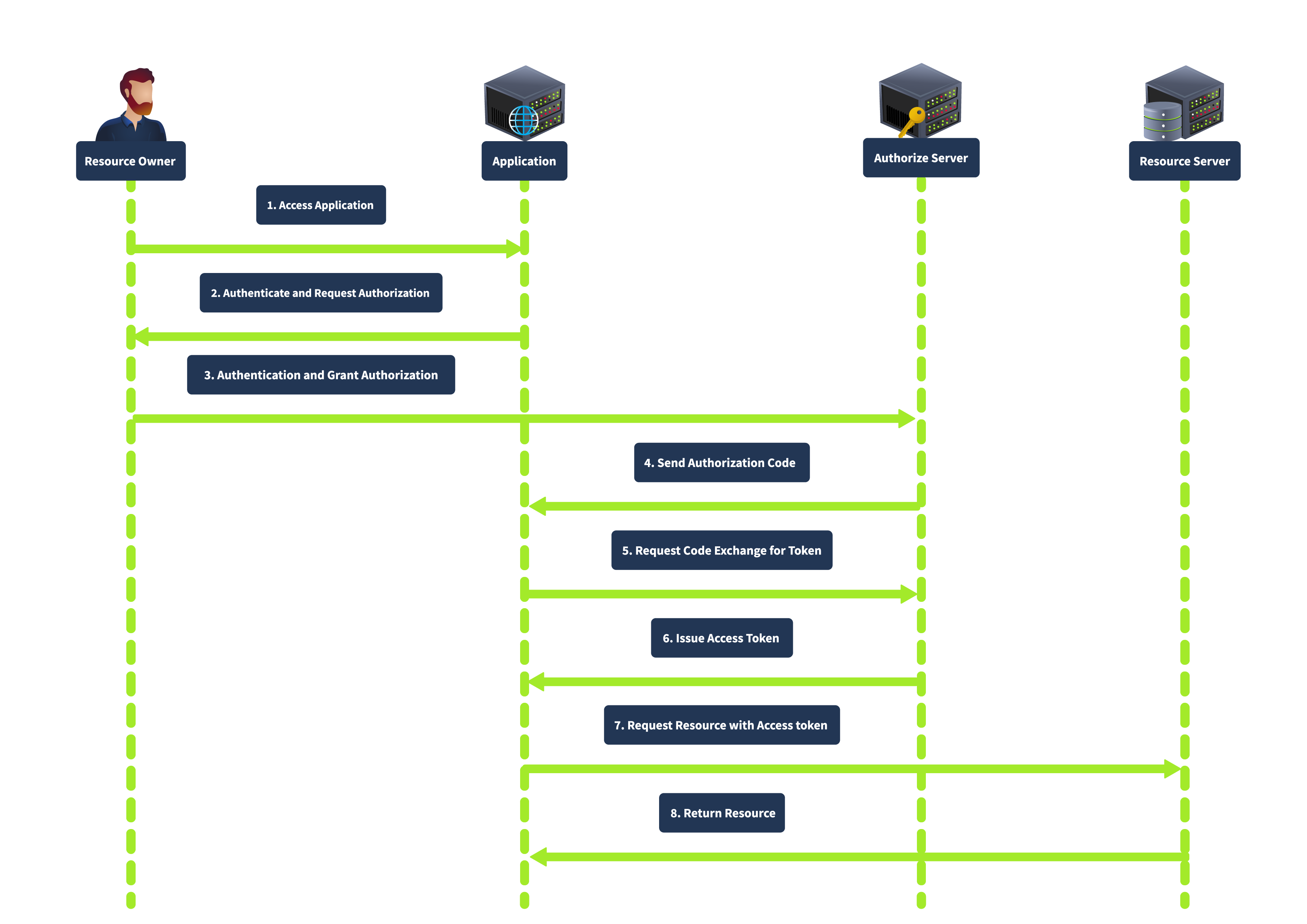
The Authorization Code grant is the most commonly used OAuth 2.0 flow suited for server-side applications (PHP, JAVA, .NET etc). In this flow, the client redirects the user to the authorization server, where the user authenticates and grants authorization. The authorization server then redirects the user to the client with an authorization code. The client exchanges the authorization code for an access token by requesting the authorization server's token endpoint.
This grant type is known for its enhanced security, as the authorization code is exchanged for an access token server-to-server, meaning the access token is not exposed to the user agent (e.g., browser), thus reducing the risk of token leakage. It also supports using refresh tokens to maintain long-term access without repeated user authentication.
Implicit Grant
The Implicit grant is primarily designed for mobile and web applications where clients cannot securely store secrets. It directly issues the access token to the client without requiring an authorization code exchange. In this flow, the client redirects the user to the authorization server. After the user authenticates and grants authorization, the authorization server returns an access token in the URL fragment. The complete flow is shown below:
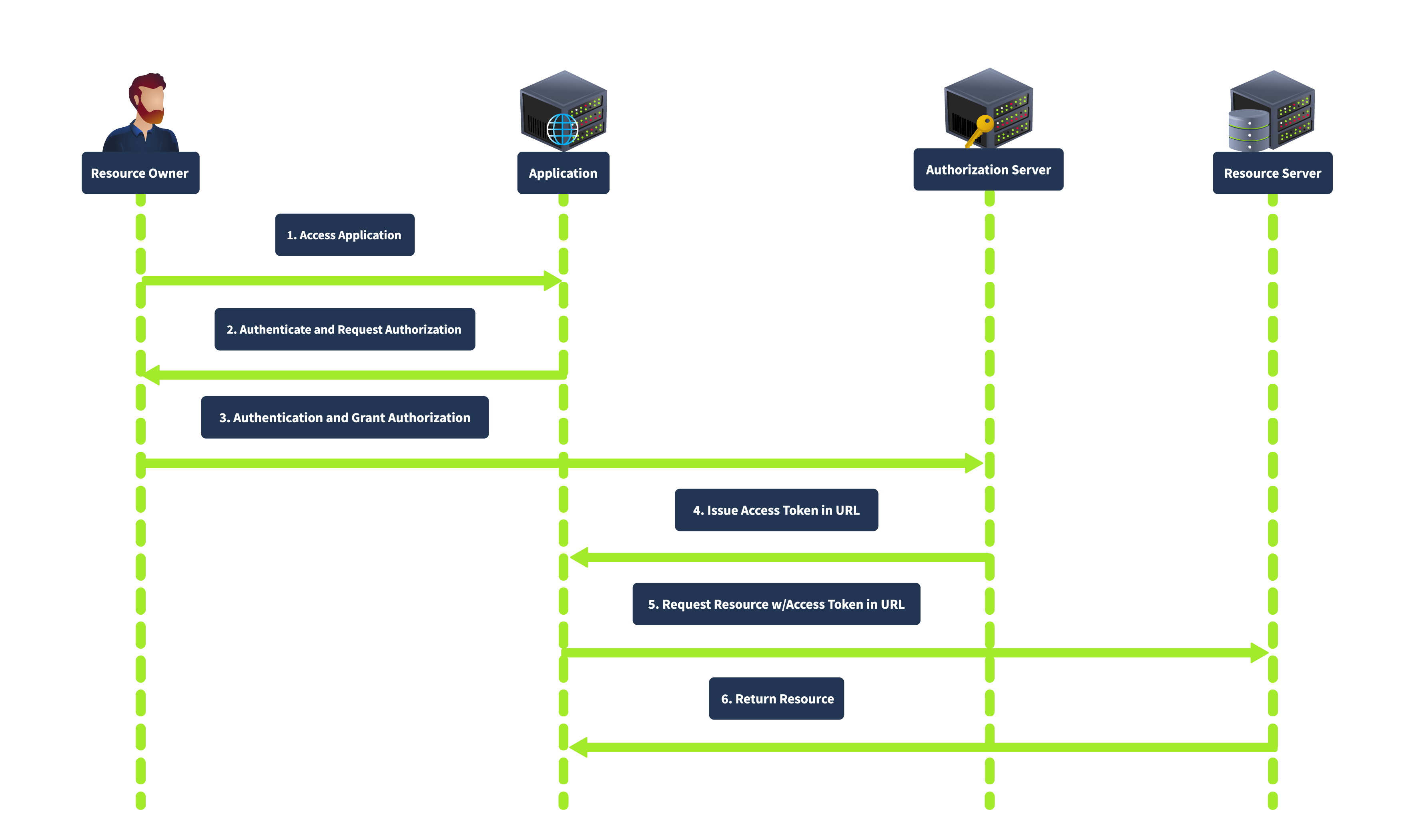
This grant type is simplified and suitable for clients who cannot securely store client secrets. It is faster as it involves fewer steps than the authorization code grant. However, it is less secure as the access token is exposed to the user agent and can be logged in the browser history. It also does not support refresh tokens.
Resource Owner Password Credentials Grant
The Resource Owner Password Credentials grant is used when the client is highly trusted by the resource owner, such as first-party applications. The client collects the user’s credentials (username and password) directly and exchanges them for an access token, as shown below:
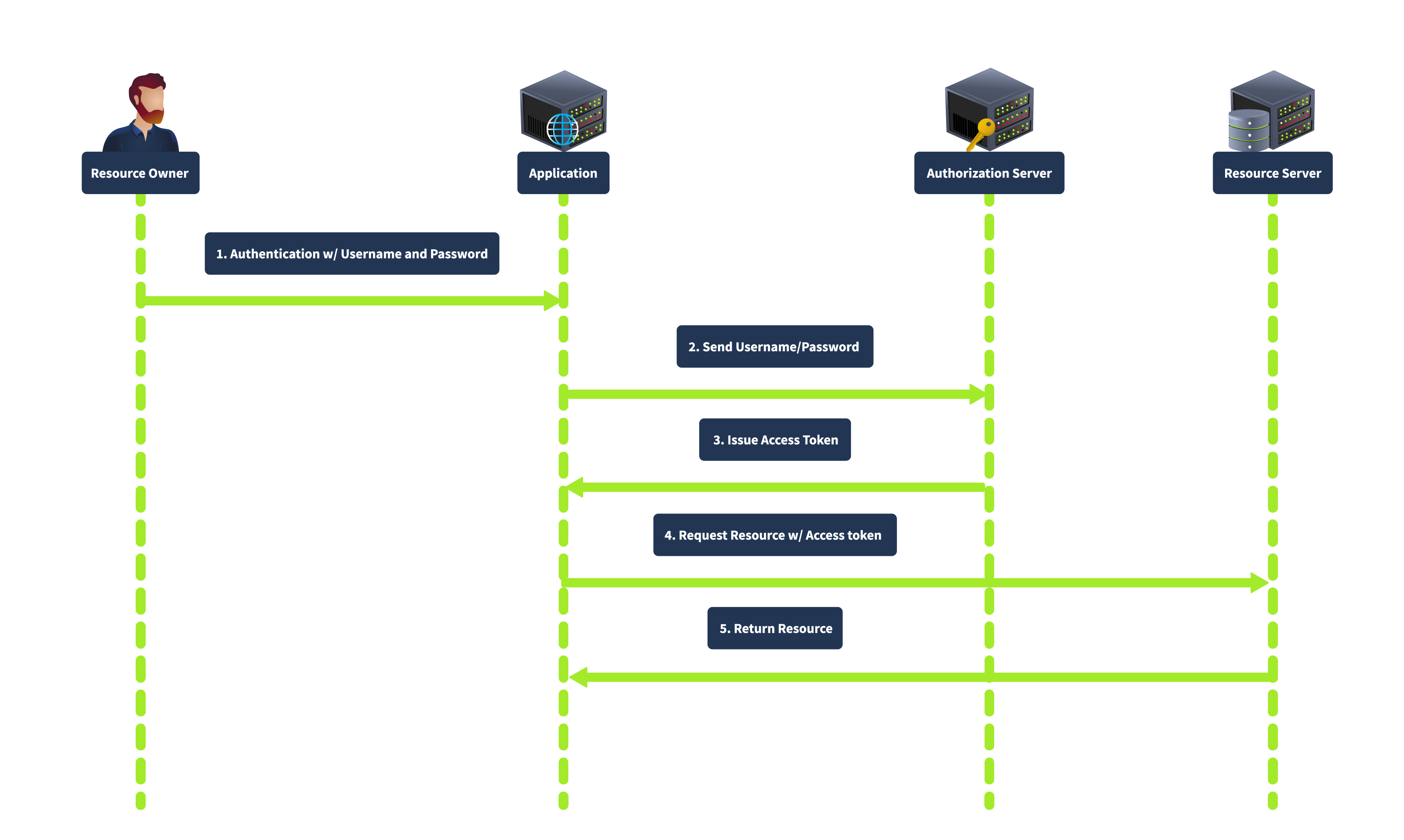
In this flow, the user provides their credentials directly to the client. The client then sends the credentials to the authorization server, which verifies the credentials and issues an access token. This grant type is direct, requiring fewer interactions, making it suitable for highly trusted applications where the user is confident in providing their credentials. However, it is less secure because it involves sharing credentials directly with the client and is unsuitable for third-party applications.
Client Credentials Grant
The Client Credentials grant is used for server-to-server interactions without user involvement. The client uses his credentials to authenticate with the authorization server and obtain an access token. In this flow, the client authenticates with the authorization server using its client credentials (client ID and secret), and the authorization server issues an access token directly to the client, as shown below:
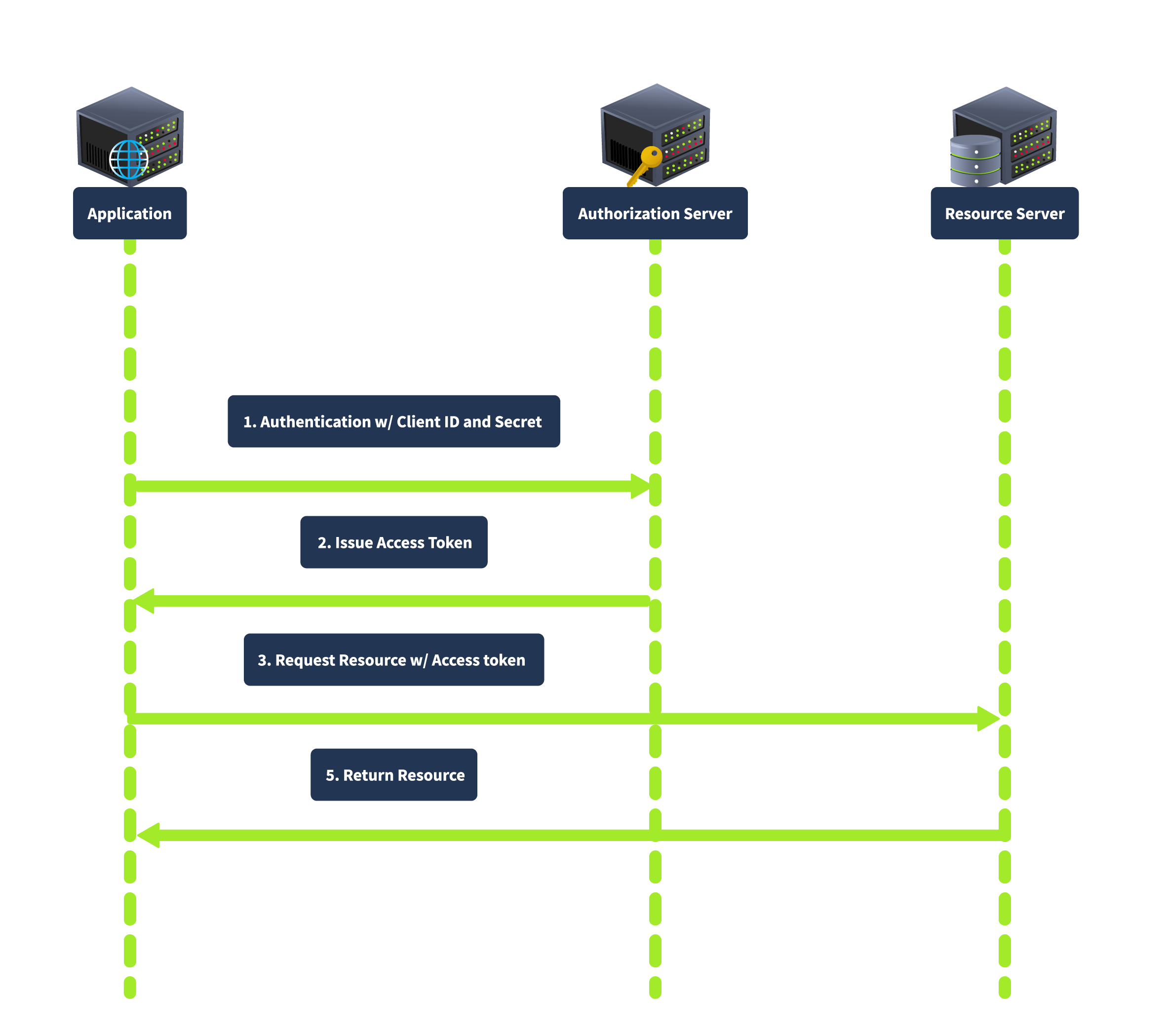
This grant type is suitable for backend services and server-to-server communication as it does not involve user credentials, thus reducing security risks related to user data exposure.
The next task will show how the OAuth flow works within a web application.
**What is the grant type often used for server-server interaction?**
**Answer:** Client Credentials
Task 4 How OAuth Flow Works
**What is the cliend\_id value after initiating the OAuth 2.0 workflow?**
Answer:
**What parameter name determines the time validity of a token in the token response?**
Answer: expires\_in Task 5 Identifying the OAuth Services
Identifying OAuth Usage in an Application
The first indication that an application uses OAuth is often found in the login process. Look for options allowing users to log in using external service providers like Google, Facebook, and GitHub. These options typically redirect users to the service provider's authorization page, which strongly signals that OAuth is in use.
Detecting OAuth Implementation
When analyzing the network traffic during the login process, pay attention to HTTP redirects. OAuth implementations will generally redirect the browser to an authorization server's URL. This URL often contains specific query parameters, such as `response_type`, `client_id`, `redirect_uri`, `scope`, and `state`. These parameters are indicative of an OAuth flow in progress. For example, a URL might look like this:
`https://dev.coffee.thm/authorize?response_type=code&client_id=AppClientID&redirect_uri=https://dev.coffee.thm/callback&scope=profile&state=xyzSecure123`
Identifying the OAuth Framework
Once you have confirmed that OAuth is being used, the next step is to identify the specific framework or library the application employs. This can provide insights into potential vulnerabilities and the appropriate security assessments. Here are some strategies to identify the OAuth framework:
* HTTP Headers and Responses: Inspect HTTP headers and response bodies for unique identifiers or comments referencing specific OAuth libraries or frameworks.
* Source Code Analysis: If you can access the application's source code, search for specific keywords and import statements that can reveal the framework in use. For instance, libraries like `django-oauth-toolkit`, `oauthlib`, `spring-security-oauth`, or `passport` in `Node.js`, each have unique characteristics and naming conventions.
* Authorization and Token Endpoints: Analyze the endpoints used to obtain authorization codes and access tokens. Different OAuth implementations might have unique endpoint patterns or structures. For example, the `Django OAuth Toolkit` typically follows the pattern `/oauth/authorize/` and `/oauth/token/`, while other frameworks might use different paths.
* Error Messages: Custom error messages and debug output can inadvertently reveal the underlying technology stack. Detailed error messages might include references to specific OAuth libraries or frameworks
\*\*What is the name of the toolkit used for implementing Oauth in the URL
**Answer:** django-oauth-toolkit
Task 6 Exploiting OAuth - Stealing OAuth Token
**What is the flag value after getting the access token?**\
THM{GOT\_THE\_\*\*\*\*\*\*\*\*}"
Task 7 Exploiting OAuth - CSRF in OAuth
**What is the flag value after attaching the attacker's account with the victim's account?**\
THM{CONTACTS\_SYNCED}
**What parameter name does the client application include in the authorization request to avoid CSRF attacks?**\
state
Task 8 Exploiting OAuth - Implicit Grant Flow
**What symbol separates the access token from the OAuth 2.0 implicit grant flow URL?**\
Answer: #
**Visit the URL** [**http://coffee.thm:8080/flagvalidator/**](http://coffee.thm:8080/flagvalidator/) **and enter the access token you acquired. What is the flag value?**\
Answer: THM{TOKEN\_HACKED}